Ships and planes – freight across the Atlantic
ETS2 + ATS
Sea freight and air freight between Europe and America – live on the map, click to see more.
On this page6
🚧 Coming soon – Dispolotse Dispo is being built
Ships and planes are part of the new Dispo. Your team can already read up – it will be unlocked for everyone later.
Some orders go across the Atlantic: apples from Europe to California, electronics from Chicago to Germany. Your drivers drive the truck part – across the ocean the goods travel by ship or by cargo plane. And the best part: you can watch them on the way.
The sea map – everything on the move#
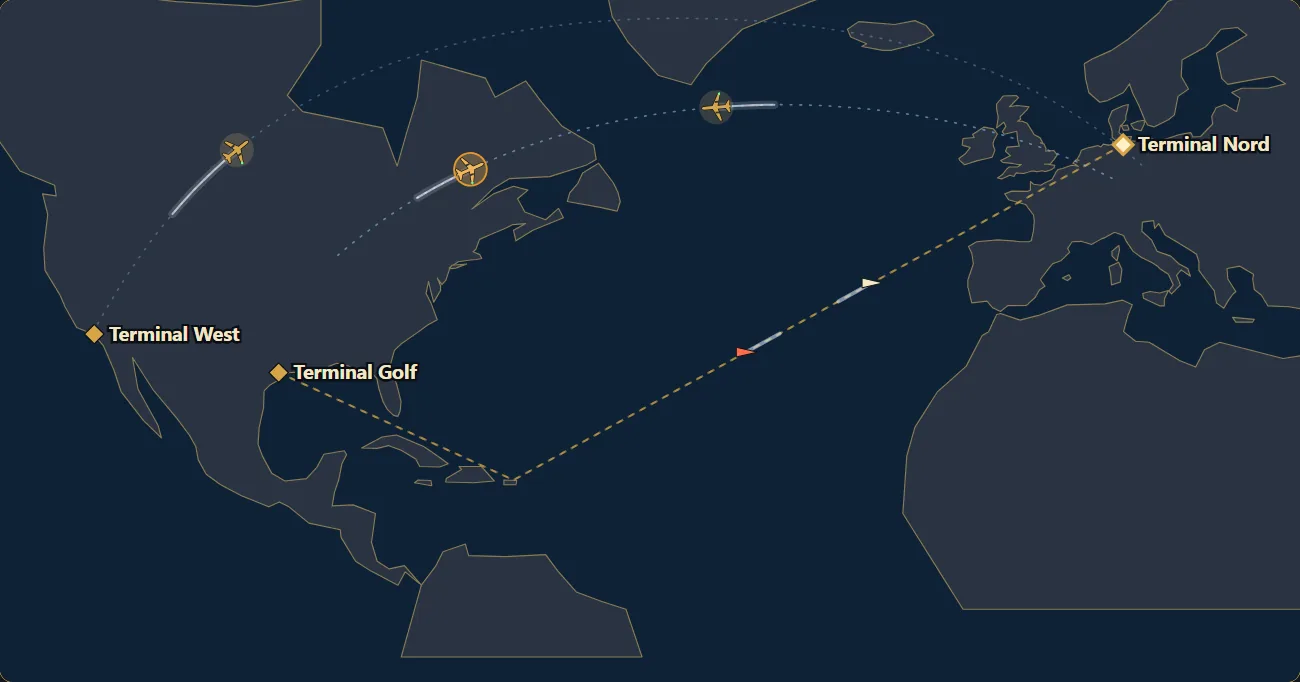
Under Port you find the sea map: ships sail their lines between the ports, planes cross the ocean on wide arcs. Everything moves on by itself – no need to reload.
Ships and aircraft spread themselves over both sides of the Atlantic – when one side runs short, some come back from the other side, empty if need be.
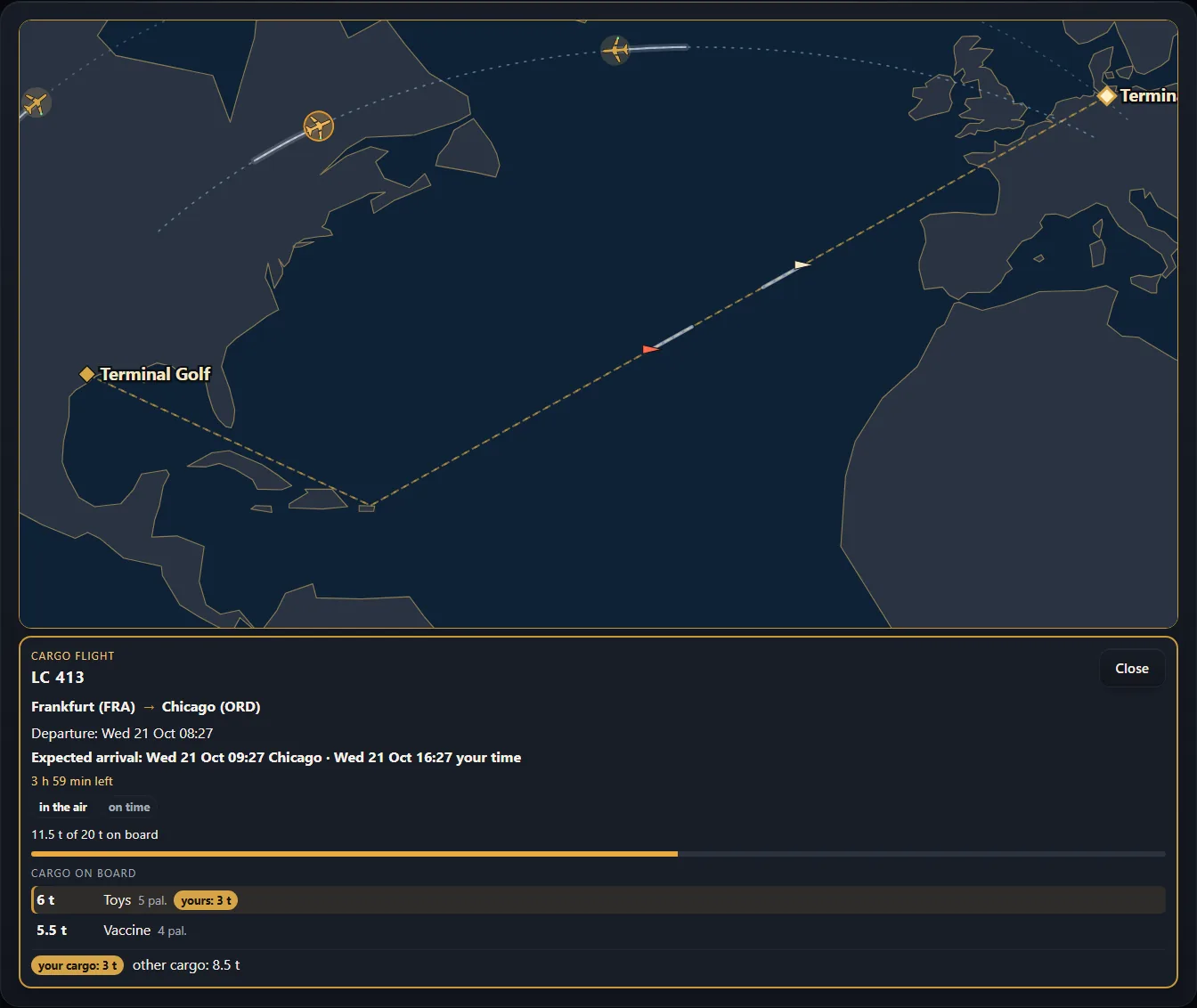
Click a ship – a card shows:
- name ("MS …"), from → to, departure
- estimated arrival – in local time at the destination and "your time" – and "x h y min to go"
- delay with reason, e.g. breakdown or storm
- what is on board: goods by goods with tonnes and pallets, plus "11.5 t of 20 t on board" as a bar
Click a plane – the same card with the flight number ("LC …"), e.g. with a delay because of fog.
If goods of your VTC are on board, they are marked in gold ("of which yours: 3 t"). Everything else is only shown as a total – other VTCs are never named.
Sea freight#
- Big ports are, for example, Hamburg, Houston and Los Angeles.
- The goods are delivered to the port store, go on board and are stored again on the other side. The next leg continues from there.
- The port's departure board shows which ships leave when and how full they are.
- A ship only comes to the berth when goods for its line are really waiting in the port. It casts off when it is full – or as soon as enough cargo for the trip has come together. Until then it waits at the berth and keeps loading; its departure on the board moves on. It does not wait forever: after a week at the latest it casts off even with little cargo. More under Every part sails.
- Ships can have a breakdown or run into heavy weather – then they arrive later. The map shows it.
Every part sails as soon as it is in the port#
Big orders often reach the port in several parts. The ship takes every part that is already in the port – you do not have to book anything and you do not wait until the whole order is there.
- Every part is stored in the port store when it arrives and loaded by the ship by itself – the oldest first, as long as there is room.
- The ship casts off as soon as enough cargo is on board – or after a week at the latest.
- Whatever comes too late sails with the next ship.
- Parts waiting in the port for the ship show on the board only as a grey line – there is nothing for you to do there, see What the board shows.
- You only need "Book onto the ship" for an import from a US port, when the goods lie in the terminal from the start.
Under Port & ships you see the terminal live: the ship at the berth, the cranes, the goods in the terminal and the gates in use.
What the board shows#
At the top of the pool on the Dispo board you see what is waiting at a port or airport for departure:
- "🚢 … t waiting in the port … for the ship – it loads by itself, nothing to do." – the goods already lie in the port store. The ship loads them by itself; there is no button for it.
- "✈️ … t waiting at the airport … for the plane – it loads by itself, nothing to do." – the same for air freight.
- Goods that are still on the ship or on the plane show as a card "Arrives …" with "Can be planned now": you can already put the next leg from the arrival port or airport – the driver can only set off after arrival. How it works: Pre-booking.
Berth, cranes and roadstead#
- Loading and discharging only happen at a berth. How many berths a port has depends on how far its terminal has been built up – up to three.
- When all berths are taken, a ship waits at the roadstead outside the port; it does not load there. Arriving ships are discharged first, then the loading ones get their turn.
- Loading takes as long as in real life: the more cranes, the faster. If two ships share the cranes, both take longer. Every crane the dealer adds makes it visibly faster.
- Once a ship is full, it casts off shortly after.
- The port view shows for every ship whether it lies at the quay or at the roadstead, how many cranes are working and when it should be done.
Weather at sea#
Depending on the season and the sea area, a ship leaving port can run into a storm on the Atlantic, a winter storm on the North Atlantic or a hurricane in the Gulf of Mexico – or the Panama Canal has low water. The ship then arrives some days later.
- The sea map shows a sign in the sea area concerned and right at the ship; hover over it and the reason appears.
- The ship tile names the reason and the delay, e.g. "Hurricane in the Gulf of Mexico · +… days".
- The card "Weather at sea" below the sea map lists every ship concerned with from → to and its new arrival – local time first, your time after it. Without weather the card is not there.
- For goods on board the deadlines of the orders move on by the same days. Nothing is charged for the weather itself. The VTC that dispatched the goods gets a message.
Import from a US port#
Some orders in the pool start right in a US port, e.g. in Houston or Los Angeles: the goods are already in the terminal and have to go to Europe. No truck in America is needed for that.
- The order card says "Lying in the port … · ship to …".
- "Book onto the ship" – the goods sail with the next ship to Europe.
- Once they have arrived there, you plan them from the port as usual for your ETS2 drivers.
Only a dispatcher can book onto the ship. Such imports only appear when a ship really sails to Europe – so sometimes there are more, sometimes fewer.
Air freight#
Urgent, small or valuable goods can fly – e.g. mail, vaccine, flowers, electronics. Bulk goods such as gravel do not fly.
- Flights connect the 8 biggest cargo airports: FRA ⇄ ORD (Chicago) · LEJ (Leipzig) ⇄ LAX (Los Angeles) · CDG (Paris) ⇄ IAH (Houston) · MAD (Madrid) ⇄ DFW (Dallas).
- The cargo airline "Lotse Air Cargo" has no fleet of its own – cargo space is booked. That is why its planes never break down.
- Flights run on demand: there are flights where air cargo is waiting or already under way – without cargo no flight takes off. Every flight has limited cargo space – the fill bar shows how much is still free. A flight with booked cargo always takes place.
- Lotse Air Cargo flies three aircraft sizes: Medium freighter (13 t), Large freighter (20 t) and Jumbo freighter (26 t). Which one flies depends on the booked cargo – if a flight fills up, a bigger plane comes in. The flight card shows type, tonnes and pallet positions taken.
- After landing the goods are transshipped; the card shows from when they can travel on.
- If air cargo is waiting at the airport for its flight, the board shows a grey line "✈️ … for the plane – it loads by itself" – see What the board shows.
- Fog (autumn and winter) or storm (spring and summer) can, rarely, push a flight back. It costs you nothing: the deadlines of the goods on board move on with it, and the VTC that dispatched the part gets a message.
- Air freight exists on the standard map only.
- For the truck legs to and from airports in a DLC area (e.g. Texas or Illinois) both the dispatcher and the driver need the matching DLC – otherwise the leg cannot be dispatched and is not offered to the driver. As a dispatcher your ATS DLCs must be reported for that: open the app once while ATS is installed on the PC and start ATS. For airports in America both also need ATS.
Booking a flight (dispatchers)#
- For an overseas order, "Way across the Atlantic" opens with two tiles: Ship and Flight.
- The flight tile shows the next flights with a fill bar ("12 / 20 t"), arrival in both clocks and the price. Full flights are grey.
- "Book this flight" – the confirmation names the price and "Free cancellation until …". The whole part is always booked.
- Until the acceptance cut-off you can cancel for free, after that you cannot.
Plan ahead before arrival – pre-booking#
Goods that are still on the ship or on the plane can already be planned for the next leg from the arrival port or airport – so a driver is ready when they arrive.
- Put the part that is still at sea or in the air on a leg that loads at the arrival port or airport. The board refuses other loading places.
- "Send out" as always – to one driver, to the whole VTC or publicly.
- Until the goods are discharged, the leg shows that they are still under way and when they arrive. The driver can only set off after that. If the ship is late, the time moves on by itself.
- Before taking it, the driver sees that the goods are still under way and confirms that once. After arrival he has up to three days to set off – see Pre-booked tours.
Goods without pre-booking arrive as before and are then planned on from the port or airport.
The "Airports" tab#
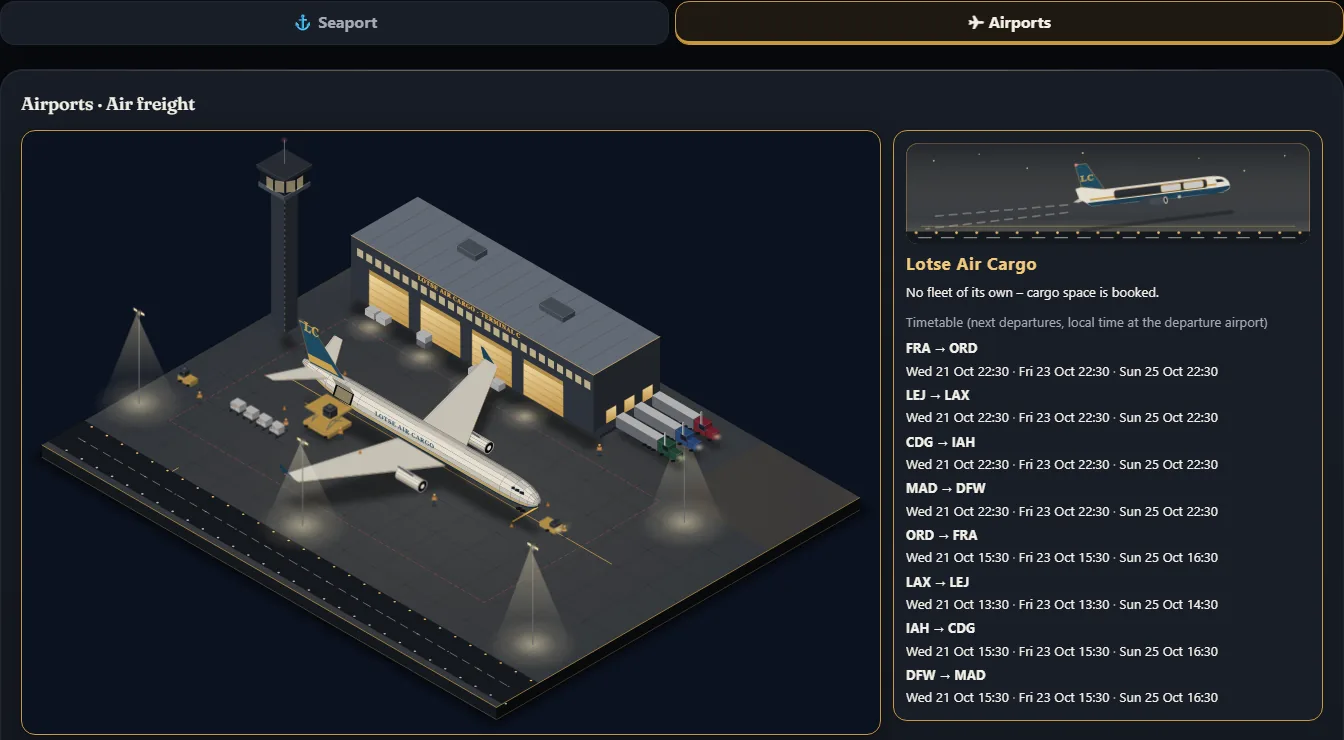
Under Port › ✈ Airports you see the apron at night, the airline card with the timetable and the 8 airports as tiles. One click opens the gold departures/arrivals board: flight number, destination, times at the airport and "your time", status, "8 of 20 t free" – and how much of it is your cargo.
See also: Dispo for dispatchers · Driving pre-booked tours · Live map
Related
- ETS2 + ATSDriving Dispo legsTake legs "for you", drive them in the game and hand the goods over to the next driver.For drivers
- ETS2 + ATSDispo for dispatchers – planning chainsTake orders from the pool, plan chains, hand out legs or make them public – without ever losing track.Companies (VTC)
- ETS2 + ATSLive mapThe live map: where you and other drivers are right now.For drivers