Subcontractors and employees
ETS2 + ATS
The two ways of driving for a company – pay, costs, company vehicle, promotion, leave and personnel file.
On this page6
In a company you drive in one of two ways. Which one is stated in your application – and you can switch later.
Subcontractor or employee?#
| Subcontractor | Employee | |
|---|---|---|
| Who pays diesel, tolls, ferries and car trains? | you, from your bank account | the company account |
| What do you drive? | your own or a truck you rented yourself | the company vehicle assigned to you |
| Who pays repairs? | you, for your vehicle | the company, for its vehicles |
| What do you get? | your share of the job; your role may add a "Per-km bonus for subcontractors" | a wage: "Fixed wage per month" and "Wage per kilometre", depending on your role |
Both kinds work side by side in one company. The profile says whether a company is looking for subcontractors, employees or both.
The company sets the wage per role. When it is saved the app checks that it does not fall below the minimum wage – it is shown in "My company" ("Minimum wage: … per month and … per kilometre").
Switching#
Under "My company" › "Employment" you file a request with "Request change" – with a reason. Your company accepts or declines; the answer tells you when the change takes effect.
Rank and promotion#
Every company has grades (ranks, for example trial driver, driver …) and functions (for example Dispatch or Accounting). A grade can come with automatic promotion – "From … days, … jobs, … km". Others are "Assigned by hand only." You see your rank on the "Companies" page under "Your company". More: Roles and rights.
Some companies schedule a driving test before a promotion. Appointment, pass or fail then appear in your personnel file.
Reporting leave#
You may take leave in a company too – report it so the team knows:
- "My company" › "Leave" (on the web: "Leave" in the company pages).
- Enter the first and the last day. The app shows beforehand how many calendar days that is and how many days of leave are still free.
- "Report leave". "Withdraw" takes it back.
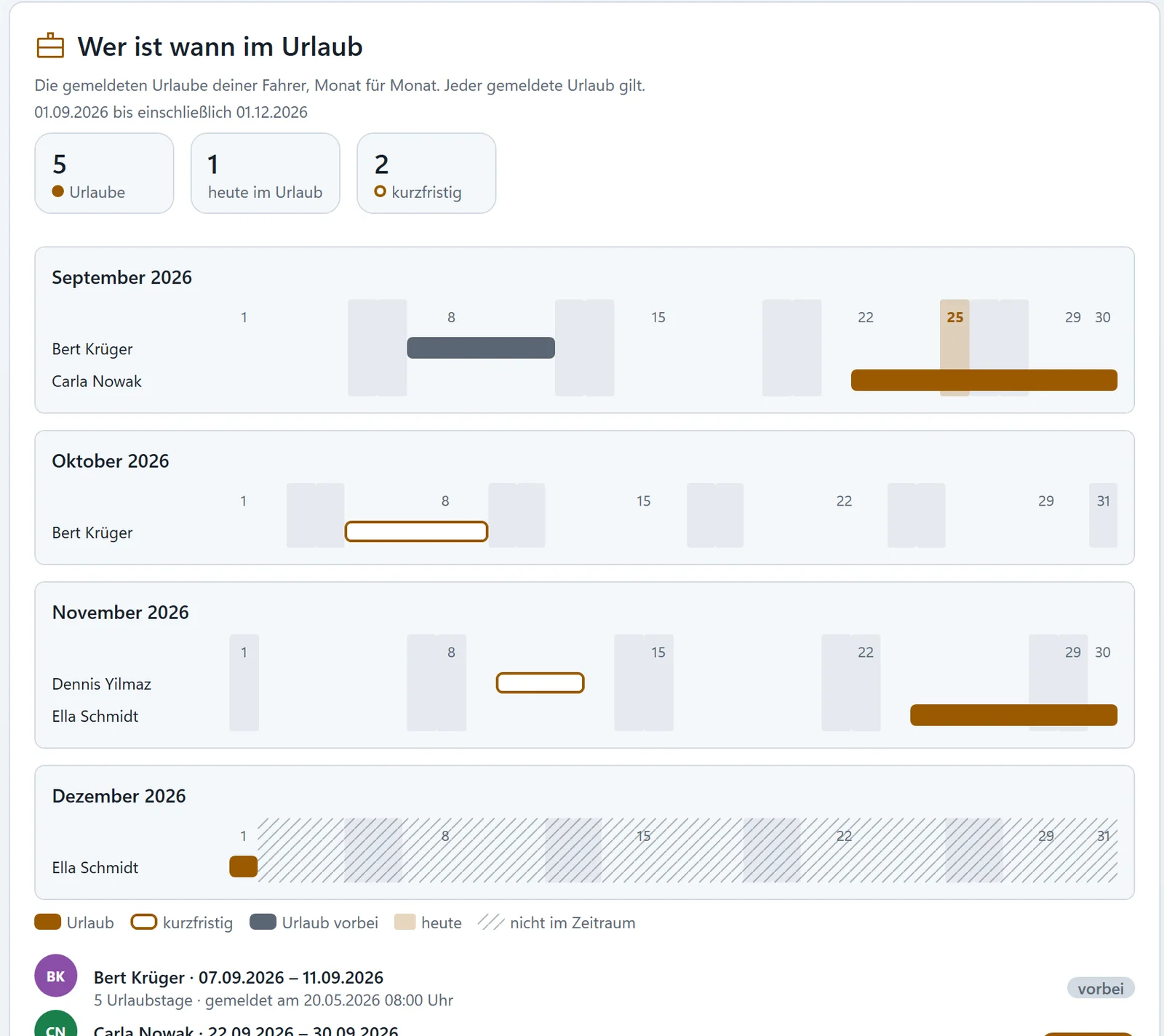
Saturdays and Sundays count too; every calendar day you do not drive is used up. Every company decides itself how many days of leave its drivers get a year ("Days of leave per driver"). While you are on leave you do not count as inactive. The calendar "Who in the team is on leave when" shows the leave of all drivers and staff month by month.
Your personnel file#
"My company" › "Personnel file" holds everything about you in this company:
- type of employment and "With the company since"
- your jobs and kilometres in this company and in total
- wages, bonuses and fines
- the "History of roles" – which role you had when
- test reports and a pending resignation
Apart from you, only the owner and whoever holds the right "See personnel file" may see it.
Bonuses#
The owner (or whoever holds "Order bonuses") can pay bonuses – to individual drivers or with "Bonus for the crew" to everyone. The money goes from the company account to your bank account; the reason appears on your statement. If your company reaches a company goal, everyone gets the bonus named there.
Related
- ETS2 + ATSRoles and rightsWho may do what in a company – grades and functions, the rights in eleven areas, the log and inactivity.Companies (VTC)
- ETS2 + ATSStatistics and company goalHow your company is doing, the internal leaderboard and shared goals by kilometres or tonnes with a bonus for everyone.Companies (VTC)
- ETS2 + ATSFinding and inviting driversFind drivers without a company in the driver exchange, invite them, follow your invitations – and present your company with languages, games and your public advertising text.Companies (VTC)