Workshop
ETS2 + ATS
Repairs, service and parts in the workshop.
On this page7
In the workshop you see what needs doing on your vehicles, what it costs and how long they will be off the road. Real spanners at work here — with a waiting list, spare parts and a date for when it will be ready.
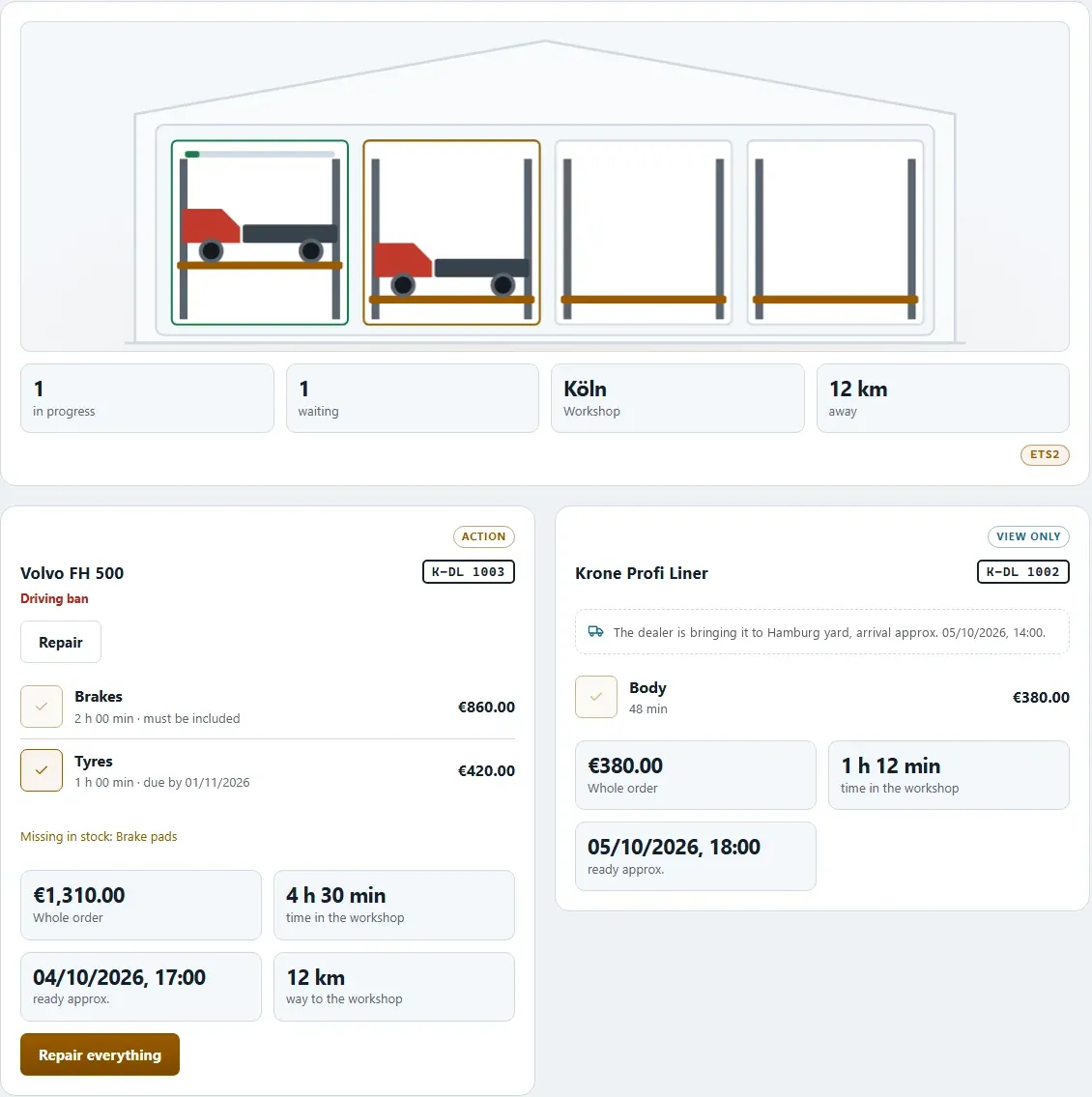
What the page shows#
- "What needs doing" — vehicles that need attention and the parts that should be done
- "In progress" — your jobs in the workshop
- "Maintenance" — upcoming services, by kilometres or by date
- "Recently repaired"
At the top it says which workshop you use — your own workshop in your yard or an outside workshop — and what an hour of labour costs there.
Placing an order#
- Tick the boxes"Tick what should be done." If a vehicle is banned from driving, the parts needed are mandatory and cannot be unticked.
- Check the cost — The line "Parts … + labour … = …" shows the amount. If a part is missing, it says so.
- Place the order"Place the order" gets things going. You do not have to — if you decline, the vehicle keeps driving.
When a vehicle is standing and it is about time, the app also asks on its own: "To the workshop?" — with "To the workshop" or "Not now". If your rig is on the road, the workshop can only start once it has stopped.
Coming in the next update
You decide yourself when your trucks go into the workshop — and in a company, for the company's vehicles too.
Which component needs which spare part?#
Every vehicle has components that wear — five on a truck, one on a trailer. When a component drops below the repair threshold, it appears under "What needs doing". For the repair the workshop needs exactly these spare parts:
| Component | Spare part | Quantity |
|---|---|---|
| Chassis | Air spring bellows | 1 |
| Engine | Radiator and engine parts | 1 |
| Transmission | Clutch kit | 1 |
| Cab | Body and glass | 1 |
| Wheels | Tyre | 6 on a 4x2 · 8 on a 6x2 · 10 on a 6x4 |
| Trailer | Tyre | 6 |
| Trailer | Wheel bearing set | 3 (one per axle) |
| Trailer | Air spring bellows | 1 |
| Trailer | Curtain | 2 (both sides) |
| Trailer | Trailer parts | 1 |
The brakes are not part of the wheels — they come into the workshop through maintenance or a breakdown (see below).
Breakdowns and damage on the road#
If something happens on the road, the breakdown brings its own spare part:
| What happened | Spare part |
|---|---|
| Tyre blown on the truck | Tyre — 2, the twin pair is changed together |
| Tyre blown or tread separated on the trailer | Tyre — 1 |
| Truck tyre worn out (found at a service) | Tyre — 4, a whole axle |
| Brakes worn, brake calliper stuck | Brake pad set and brake discs — per axle 1 pad set and 2 discs |
| Flat battery | Battery set (two batteries, 24 V) |
| Oil leak | Engine oil — 1 canister of 20 l |
| Diesel gelled | Filter set |
| Clutch slipping | Clutch kit |
| Air spring burst, spring broken | Air spring bellows |
| Wheel bearing overheated or worn out | Wheel bearing set |
| Radiator leak, turbocharger, injection, particulate filter, compressed air, power steering, gearbox damage, fifth wheel | Radiator and engine parts |
| Trailer refrigeration unit failed | Radiator and engine parts |
| Stone chip in the field of view | Windscreen |
| Small stone chip at the edge of the windscreen | no part — it is repaired |
| Mirror, collision with an animal, manoeuvring damage, break-in | Body and glass |
| Headlight, fuse, wiper, cable, control unit, marten damage, starter motor, alternator, tachograph | Electrics |
| Trailer tail light or coiled cable, fault in the trailer brake system | Electrics |
| Curtain torn, door or landing gear stuck, kingpin, underrun guard, frame crack, tension strap, mud flap | Trailer parts |
| Load securing torn | Trailer parts — 10 (ten straps) |
Maintenance#
Scheduled services use parts too:
| Service | Spare parts |
|---|---|
| Service with oil change | Filter set 1 · engine oil 2 canisters of 20 l · Electrics 1 (air dryer cartridge) |
| Brake servicing | Truck: 2 brake pad sets and 4 brake discs (4x2), 3 and 6 (6x2, 6x4) · Trailer: 3 and 6 |
| Tyre change | Tyres: 6 (4x2), 8 (6x2), 10 (6x4) · Trailer: 6 |
| Engine and gearbox servicing | Radiator and engine parts 1 |
| Clutch | Clutch kit 1 |
| Battery | Battery set 1 |
| Wheel bearings | Wheel bearing set: 2 (4x2), 3 (6x2, 6x4) · Trailer: 3 |
| Curtain replacement | Curtain 2 |
| Refrigeration unit service | Refrigeration parts 1 |
| Roadworthiness test (in ATS: DOT inspection), safety inspection | none — it is a check, not a repair |
ETS2 and ATS
The spare parts have the same names in both worlds, and every component needs the same parts. Only the prices depend on the world.
Waiting list and progress#
Every job shows its place ("Your vehicle is number 3 in the queue"), its status — "being worked on", "waiting for a bay", "waiting for a part" — and the times: "start approx. …", "ready approx. …", "… of … h". If a vehicle has to be towed, the route and the trip there and back are listed too.
If a job is still waiting to be accepted, the app says so as well: the workshop manager or the dealer is looking at it and will accept it within 24 hours — after that you will see when your truck or trailer will be ready.
Replacement vehicle#
While your vehicle is in the workshop you get a replacement — a loan truck or loan trailer. The daily rate is only charged when you actually drive a job with it. You see who pays (you or your VTC), and you can keep the loan truck or rent one for a week instead.
Workshop manager#
With a workshop of your own you can hire a workshop manager — he looks after all your workshops. A second one can stand in during holidays or illness; there are never more than two. Both appear on the card, with the day they return if they are away. He also lines up repairs for you.
Building your own workshop#
You can build a workshop in your yard and expand it ("Workshop expansion", "Build a hall"). You get a cost estimate with the build time first. If you tear something down, there is no money back.
In a company
Decisions about your company's vehicles are made by the owner or whoever has a role for it.
Related
- ETS2 + ATSOwn yard, fuel station and storeYour yard with parking spaces, your own diesel and AdBlue station and a parts store.For drivers
- ETS2 + ATSOwn truck, rental, loanOwn trucks and trailers, rental and loan — what the app shows.For drivers
- ETS2 + ATSCurrent account and bankCurrent account, overdraft, loan and statement — one account for ETS2 and ATS.For drivers