Current account and bank
ETS2 + ATS
Current account, overdraft, loan and statement — one account for ETS2 and ATS.
On this page5
This is where everything comes together: earnings, costs and whatever you transfer yourself. Everything is calculated and booked on the server — the app shows you what applies and why. In the app: MONEY › "Bank account", "Bank" and "Company loan".
All play money
Balances, prices and wages are game values. There is nothing to buy and nothing to win — not a single cent of real money.
Your bank account#
Four tabs: "Accounts" · "Transactions" · "Transfer" · "Standing orders". You have a private account; with a company, a company account is added. Each has an account number. To get you started you receive a starting bonus — the app tells you how much.
The card shows your overdraft limit: how far your account may go into the red. If you have no overdraft, it says so plainly: "no overdraft - nothing below €0".
Instructed — money on its way to you#
Not every job pays at once. Under "Instructed - payout expected" you see what is still to come and what it is waiting for: the client, your company's accountant, the automatic settlement or the bank — each with the day it is expected to arrive.
The statement#
Browse month by month, with opening and closing balance and a search. Every booking has a "Voucher" — with the other account and who triggered it. You can filter by period, income and spending, and by group: revenue, diesel, toll/ferry/train, rent, fines, life, bank, taxes, workshop, dealer, construction.
Transfers#
Enter the recipient's account number (use "Who owns this number?" to check whose it is), the amount and a reference — then "Check" and "Transfer now". Careful: there is no undo.
Standing orders#
A fixed amount that is transferred automatically — monthly, on the last day of the month, weekly or daily. Every standing order needs an end date. Whether it was set up is shown in a window right in front of you. You see the next date and can "Cancel" at any time.
Account fees#
The account costs a basic monthly fee plus a small amount per booking. The app shows what your plan costs and what the other plans would cost with the way you use it. A change of plan applies from the first of the next month.
The bank#
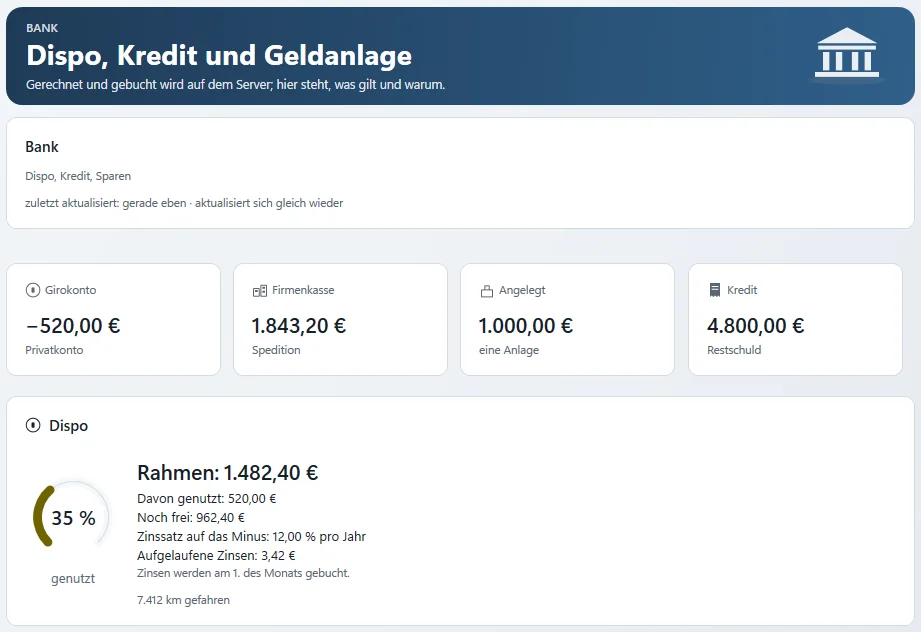
At the top are your figures: Bank account, Company account, Savings and Loan.
Overdraft#
Limit, how much of it is used, how much is left and the interest rate on the negative balance.
Loan#
The bank shows your credit limit, what it depends on and your credit rating — with points for experience, an account that is not in the red, instalments paid on time and your home. You apply for a loan with an amount and a term; the app works out the monthly instalment and the repayment plan for you beforehand. While a loan is running you see the balance, the instalment, the next due date and how many instalments are paid. Extra repayments are possible at any time.
If your limit is not enough, you can "Ask the bank …". The bank replies with an approval, a counter-offer or a refusal with reasons. An offer states the interest, monthly instalment, total amount and how long it is valid — money only flows once you accept.
A loan costs you every month
A loan helps with your first truck — but the instalment is due every month, even in weeks when you do not drive.
Saving#
Instant access savings are available at any time; a fixed-term deposit runs for 3, 6, 9 or 12 months. Interest is booked on the 1st of the month. If you close a fixed-term deposit early, the bank deducts something — the app shows beforehand what you will get back. A company can save money too.
The company account#
With a company comes a company account with its own overdraft and a performance line (kilometres, jobs, driving hours). It is visible to whoever may handle the company's accounts.
The monthly letter by e-mail#
If you like, you get a summary of your month by e-mail early on the 1st of every month — only if something happened the month before. Switch it on with "Monthly overview by e-mail"; every mail has an unsubscribe link. Owners also get a company letter.
American Truck Simulator: dollars and euros#
ATS is switched on: both games run on one account with one shared money pot — no second current account, no second bank. In ATS the game counts in dollars; the app converts every amount into euros at the weekly exchange rate. The rate is fetched anew once a week; each booking shows the dollar amount, the rate and the day it is from.
How it looks
ATS amounts always show as "$ … (… €)" — the dollar amount first, behind it the euro amount booked to your account. Your ETS2 amounts stay in euros, just as you know them.
Taxes#
There is no separate tax page, and you do not need one: taxes appear in the statement under the group "taxes", tax notices arrive in the mailbox, and every vehicle lists purchase, input VAT and depreciation under Tax & book value. Vehicle tax is shown on the vehicle card.
During the beta
More banking: savings goals with progress, buying on instalments, a shared kitty for convoys and invoices between companies.
Related
- ETS2 + ATSMy lifeHome, car, leisure and shopping — your life besides driving.For drivers
- ETS2 + ATSOwn yard, fuel station and storeYour yard with parking spaces, your own diesel and AdBlue station and a parts store.For drivers
- ETS2 + ATSDriver exchange – find a company or be foundFind companies by game, language and measured driving style, show yourself as a driver without a company, and accept or decline invitations.For drivers