Apply to a company
ETS2 + ATS
Step by step – find a company, apply, get accepted, probation, resign or leave.
On this page7
This is how you get into a company – and out again if it no longer fits.
1. Find a company#
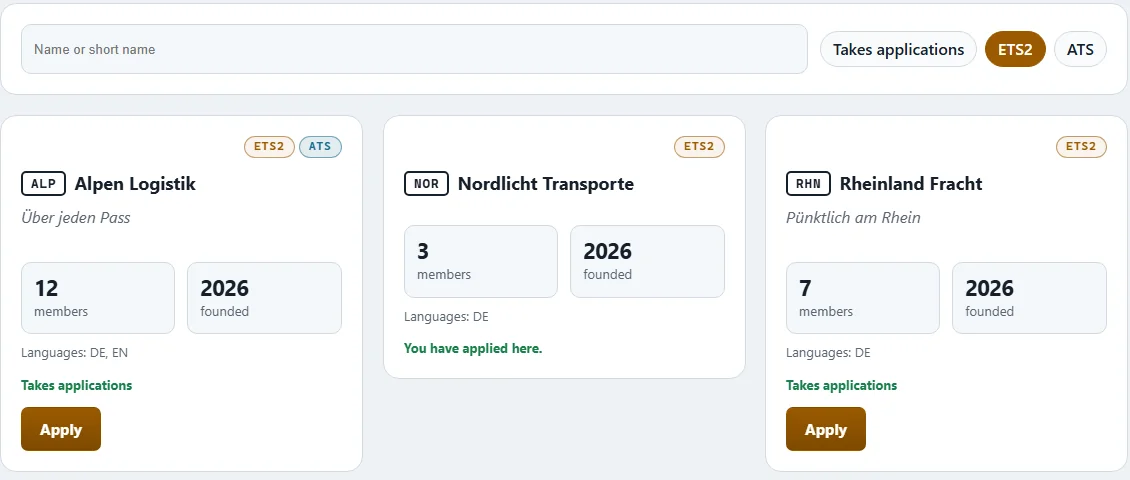
Open "Companies". It lists every company you can apply to – with badge, name, short name, number of members, year founded and languages.
- "Search companies" searches by name or short name.
- The filter "Takes applications" shows only the companies looking for drivers right now.
- The profile shows slogan, advertising text, whether subcontractors or employees are wanted, and often a Discord link. Many companies like to get to know applicants in a chat first – feel free to drop by.
Would you rather be found? How to put yourself on the driver exchange and receive invitations: Driver exchange.
2. Apply#
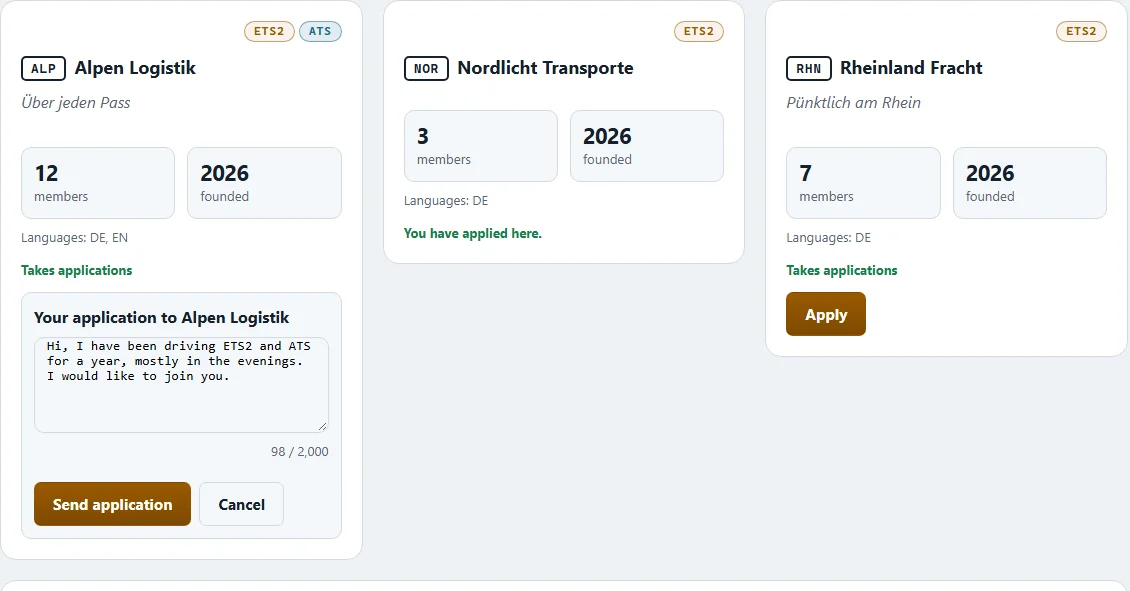
- Pick the company and click "Apply".
- Under "Why you want to drive there" write a few sentences: how you drive, when you drive, what you are looking for.
- Click "Send application". The app confirms: "Your application to … is on its way."
Good to know:
- You can have only one open application per company.
- If you already belong to a company, leave it first.
- If a company is not accepting applications right now, none can be sent.
3. Wait and check#
"My applications" shows what you wrote and what became of it: open, accepted, rejected or withdrawn – with dates and the company's reply.
Changed your mind? "Withdraw application" takes it back as long as nothing has been decided.
4. Accepted – probation#
The company sees your application together with your jobs, kilometres and driving hours so far. The owner, or whoever holds the right "Applications", accepts or rejects – both with a message of their own.
Once accepted you get a message and start with the role trial driver. What changes after that is up to your company: it decides when a trial driver becomes a driver and which roles exist (see Roles and rights).
Whether you drive as a subcontractor or as an employee makes a big difference to pay and costs. Read Subcontractors and employees.
5. Deciding applications (for owners)#
New applications arrive in the "Applications" tab of "Run the company".
- You see the applicant's message, their record (jobs, km, driving hours) and whether they want to join as a sub driver or as an employee.
- Click "Accept" or "Reject" and add a message if you like.
- After accepting they appear in your "Crew".
"Also show the ones already decided" shows older applications.
Approaching drivers yourself and inviting them: Finding and inviting drivers.
6. Leaving – resign or leave#
There are two ways:
- "Resign" under "My company" › "Employment": you write why you want to resign. The text goes to the owner and everyone who manages staff. The answer tells you when the resignation takes effect.
- "Leave the company" on the "Companies" page: here too you briefly write your reason – your company gets to read it.
What stays with you: your open credits, your kilometres and hours, and your bank account. What is gone: your rank and your roles in this company.
An owner cannot leave their own company. Handing over and closing are separate procedures.
7. Being dismissed#
The owner, or whoever holds the right "Dismiss from company", can dismiss a member – always with a reason. Someone who has not been around for a long time can also be dismissed for inactivity; how your company handles that is described under Roles and rights › Inactivity. Your account and everything you have driven always stay with you.
Related
- ETS2 + ATSDriver exchange – find a company or be foundFind companies by game, language and measured driving style, show yourself as a driver without a company, and accept or decline invitations.For drivers
- ETS2 + ATSRoles and rightsWho may do what in a company – grades and functions, the rights in eleven areas, the log and inactivity.Companies (VTC)
- ETS2 + ATSSubcontractors and employeesThe two ways of driving for a company – pay, costs, company vehicle, promotion, leave and personnel file.Companies (VTC)