Driving and tachograph
ETS2 + ATS
The driving page, driving times and the tachograph with the statement of every job.
On this page7
The Drive page is your dashboard while you are driving in the game: route, cargo, speed, fuel, condition and the time left to your destination. There is nothing to start — it comes alive as soon as the game is running.
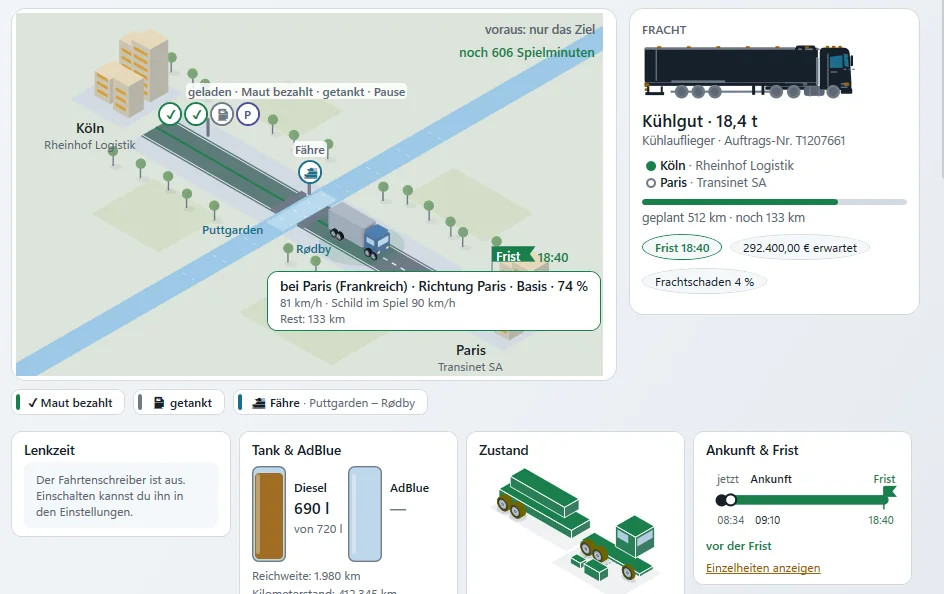
The route — your job at a glance#
At the top your job is laid out as a band from start to destination. On it appears what really happened, with place, game time and real time — nothing is predicted:
- "loaded" — the cargo is hooked up
- "Toll paid", "Refuelled", "Ferry", "Car train"
- "Break" — with "running since …"
- "Fine", if you got one
If stops are close together they share one label. Planned borders and ferries are shown as "ahead".
The cargo card#
Cargo, from, to, job (or "Free driving"), how far is left and any cargo damage. Plus what you are driving: "Your own truck", "Rented", "Company truck (quick job)" or "Client's trailer" — for rentals with the term and the "Extend" button.
The four gauges#
| Gauge | What it shows |
|---|---|
| "Driving time" | How long you have driven today and this week. |
| "Fuel & AdBlue" | Diesel and AdBlue with their levels, plus consumption and range as the game reports them. |
| "Condition" | Engine, transmission, cabin, chassis, wheels, trailer, cargo — and which part is "most worn". |
| "Arrival & deadline" | Now, arrival and deadline on one line — ahead of or behind the deadline. |
Compact while driving: while you drive, the app folds the details away — also without drive mode, as soon as the game is running and you are driving. Gauges and cards then show only their head, and one click on "Show details" shows them. A card stays open when you are late or there is a notice. If you stand still for 60 seconds or pause the game, everything is open again. Where the large dial does not fit, the speed is shown as a number.
Title row: at the top, the Drive page has a title row of its own: "What is running right now: route, cargo, time and speed". In drive mode it is hidden so that everything fits on one screen.
Rental contract: once you have been driving for 60 seconds, the app hides the card of your rental contract for truck or trailer. The band "No rental contract for the truck yet." stays until you have chosen a rate.
"To the destination" — in real time#
The time left counts in real time, not game minutes: "To the destination (real time): …", plus "Arrival approx. …" and the deadline as a clock time. At first it says the arrival will be worked out as soon as you drive, then "(getting more precise)" with a small range. In multiplayer the deadline can only be estimated roughly — and the app tells you that too.
Speed and speed limit#
The app knows the speed-limit sign in the game and shows your speed next to it, along with the top speed of this job. If you are over the limit, it keeps track; short peaks do not count. You can switch the speed display off in Settings. Anyone who speeds will find the fine later under Fines.
Where am I?#
While you drive, the app tells you where you are: "near Rotterdam", "in Rotterdam", "between … and …", "towards …". Under "What happened recently" you see the latest events of the drive.
The tachograph#
The tachograph exists twice:
Live on the Drive page it shows whether you are driving, standing or on a break, your driving time today and this week, and what is left. It is just a display: "It forces you to nothing and costs you nothing." It gives you a friendly reminder about breaks — which limits it shows is up to you under "Settings" › "Tachograph".
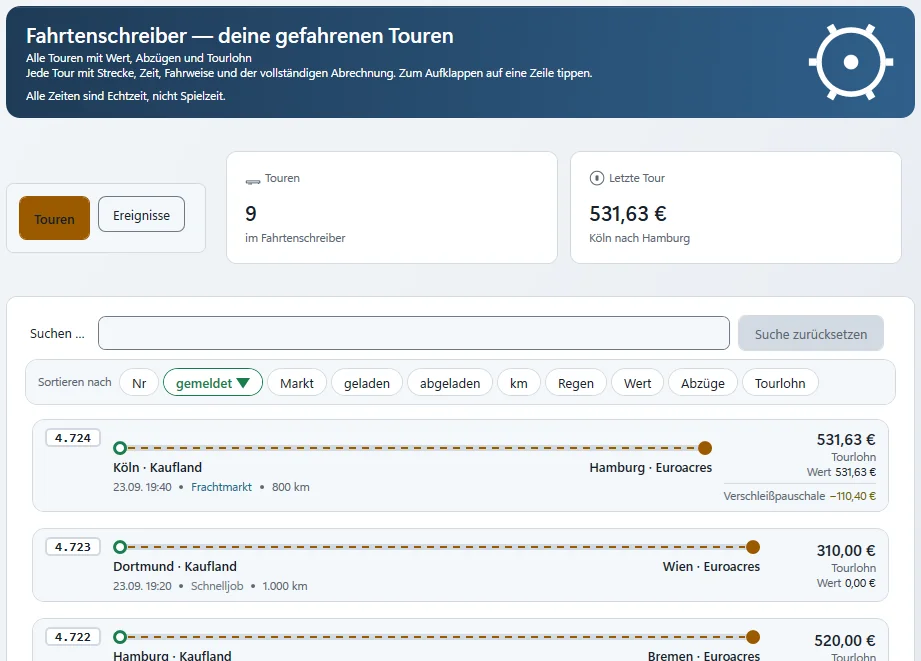
As a page (on the left under DRIVING › "Tachograph") it lists every job you have driven: reported, loaded, unloaded, kilometres, value, deductions, payout. One click expands a job:
- Settlement for this job — base freight, bonuses and deductions listed separately, and the payout
- Time and driving — en route, driving, breaks, top and average speed, time in the rain. All times are real time.
- Refuelling and payments en route — litres, price per litre and place, at the real pump price; tolls, ferries and car trains
While you drive, the app also counts accidents – how, see Accidents in the statistics.
Good to know
Diesel, tolls, ferries and car trains are charged during the drive, not only at settlement. You pay a fine yourself, not the company.
Related
- ETS2 + ATSStatistics and finesYour figures and your fines.For drivers
- ETS2 + ATSAccidents in the statisticsHow the app detects accidents, what counts as a serious accident, where you see your accidents and who else sees them.For drivers
- ETS2 + ATSOverlayThe transparent window on top of the game.For drivers