Dispatch – orders, assignment, on the road
ETS2 + ATS
Create your own orders for your drivers, assign company vehicles and see who is driving where right now.
On this page4
Dispatch decides what your drivers drive and with what. You find it in "Run the company" in the tabs "Jobs", "Assignment" and "On the road". You need the right "Dispatch" or "Assign vehicle" – or you are the owner.
Creating your own orders#
Your own orders are offered to your drivers only. The bonus is frozen when the order is created and does not change afterwards.
Let the generator build one#
In the "Create order" tab the generator rolls a chain from known cities. All three entries are optional – without them it decides on its own:
- "Kilometres (roughly)"
- "Legs"
- "Start city"
Then "Let the generator build".
Create by hand#
In the "Order by hand" tab you build the order leg by leg:
- Enter "From city", "From company", "To city", "To company", "Cargo" and "Trailer".
- "Append leg" – the draft grows. If a city or company is unknown, the app tells you exactly which.
- "Create order". "Discard draft" starts over.
An order nobody should drive any more is taken back with "Remove order".
Orders always belong to the world you create them in: an order in ETS2 only appears for drivers who are currently driving ETS2.
Assigning vehicles#
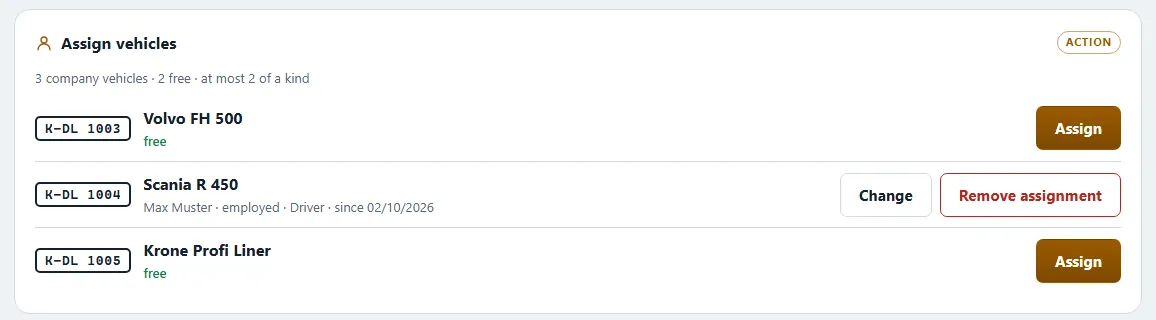
In the "Assignment" tab you decide which company vehicle is driven by which salaried driver:
- "Load assignments" – you see every company vehicle with Vehicle, Plate, Status, Driver and "Assigned since".
- Tap a row, pick a driver, "Assign".
- "Remove assignment" frees the vehicle again. From the driver's next start their own vehicle counts again.
The top line shows how many company vehicles you have, how many are free and how many are allowed at most per type and driver. The status reads "in stock", "in the workshop", "on the road" or "locked".
Subcontractors drive their own or self-rented vehicles – you do not assign anything to them. See Subcontractors and employees.
On the road – the team live#
The "On the road" tab shows who is driving right now: "Free driving" or a job, the location ("near …", "in …", "between … and …"), the direction and how far there is still to go. On the live map you also see each other – always in the world you are driving in.
Radio and convoys#
The "Radio" has its own conversations for the company, for management and for convoys. Whoever holds the Convoy planning role organises joint drives there. Whoever may "Moderate the radio" can hide a message in the company channel – always with a reason; nothing is deleted.
Related
- ETS2 + ATSSubcontractors and employeesThe two ways of driving for a company – pay, costs, company vehicle, promotion, leave and personnel file.Companies (VTC)
- ETS2 + ATSSettlement and four-eyes approvalHow your drivers' money is paid out, when it may be reduced, and how the second approval for large amounts works.Companies (VTC)
- ETS2 + ATSRoles and rightsWho may do what in a company – grades and functions, the rights in eleven areas, the log and inactivity.Companies (VTC)