App tour
ETS2 + ATS
A walk through the app overview and menu.
On this page3
The first page you see when you open the app: what is happening today, what your money is doing, what is waiting for you and how far you have come — without a single click.
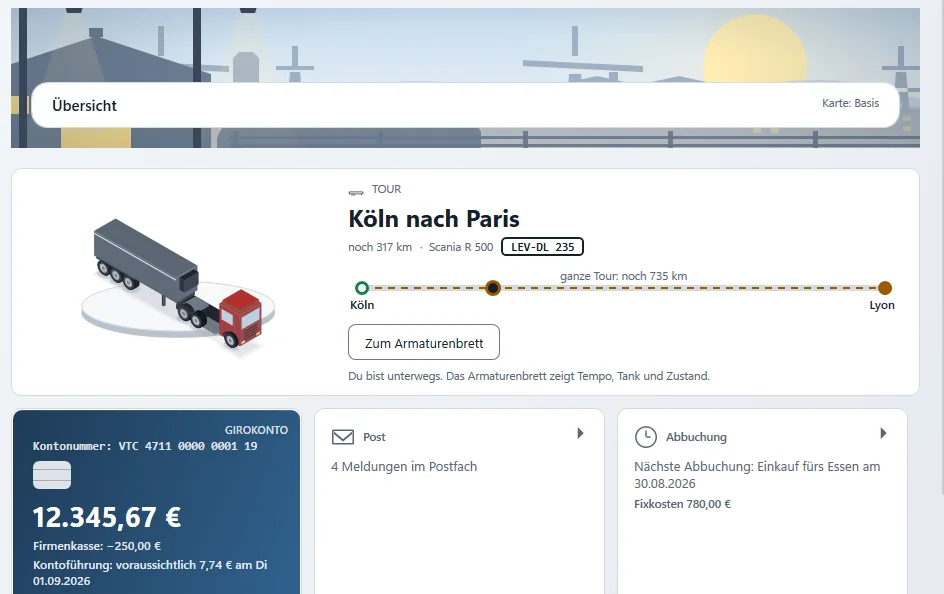
Four bands#
| Band | What it shows |
|---|---|
| "TODAY" | Your current job and your driving time. |
| "MONEY" | Your bank account (with the expected account fees), Instructed (money on its way to you, with the day of the next payment) and the next direct debit for your fixed costs. |
| "WAITING FOR ME" | New messages in the mailbox and unread radio chats — or "Nothing is waiting for you. Head out if you like". |
| "MY PATH" | Your level and how many kilometres are missing to the next one. |
Below that you find "RECENT JOBS" with kilometres and payout, and the "My map" tile (see Choose your map). Every tile opens the matching page with one click.
When you are on the road#
While you are driving, a band appears at the top: "You are on the road. The dashboard shows speed, fuel and condition." — with the button "Go to the dashboard". If you are driving a rented truck, it says so too. The big job card then replaces the small "Job" tile.
If you have not chosen a rate for a rented truck yet, a band of its own sits right at the top: "No rental contract for the truck yet.", with the rates — on every page, until you choose (more under Renting).
Second screen
The Overview is designed to show everything important at a glance on a second monitor next to the game.
The sidebar#
Navigation sits on the left — one group is always open:
- "Overview" and "Report a problem" right at the top
- DRIVING: Freight market · Drive · Fleet · Workshop · Tachograph
- MONEY: Bank account · Bank · Company loan · Fines · Statistics · My life
- COMPANY: My yard · Rental · Run the company · Companies · Mailbox · Radio · Filling station & store
- DEALER: Dealer overview · Dealer
- at the bottom: "Account" · "Setup" · "Settings"
Above it, a small cockpit shows your balance, your current job and new mail. Some items only appear once you need them.
The "Companies" page also holds the driver exchange: Driver exchange. Under "Settings" you switch the Discord status on or off: Discord status.
The result of a click — for example a new standing order or jobs being put into the game — pops up in a window right in front of you, not somewhere further down the page.
Related
- ETS2 + ATSFirst start and first jobSet up the app, telemetry, prepare your save and drive your first job step by step.For drivers
- ETS2 + ATSOwn truck, rental, loanOwn trucks and trailers, rental and loan — what the app shows.For drivers
- ETS2 + ATSDriver exchange – find a company or be foundFind companies by game, language and measured driving style, show yourself as a driver without a company, and accept or decline invitations.For drivers